

ND Email SMTP routes every email that your WordPress website sends via wp_mail() through your SMTP server. Contact forms, shop emails and system messages therefore leave the website via a mailbox that you control, rather than via PHP’s insecure default sending method.
Secure email delivery from your website via your own email account
- Emails from the website are delivered reliably and are less likely to end up in the spam folder.
- Once you have set it up, check the connection by sending a test email; this will display an SMTP dialogue if the connection is successful or if an error occurs.
- With ND Email Log, you can always see which emails have been sent via this server.
Furnishings
Set the host, port and encryption (TLS, SSL or none) according to your email provider. Logging in with a username and password is the standard procedure. The password will no longer be displayed once it has been saved. The „From“ address and „From“ name will override the WordPress default if an email does not specify its own sender. If you select ‘Force From’, these settings will apply to all outgoing emails. The Reply-To address is only set if the email does not already have one. Contact forms and WooCommerce will therefore retain their own reply-to addresses. Selecting ‘Force Reply-To’ overrides this.
You can test the connection by sending a test email, for which you should enter your own email address as the recipient. The transcript shows the dialogue between the website and the mail server. Any login details are obscured in the transcript, and the transcript is not saved.
The Dashboard widget
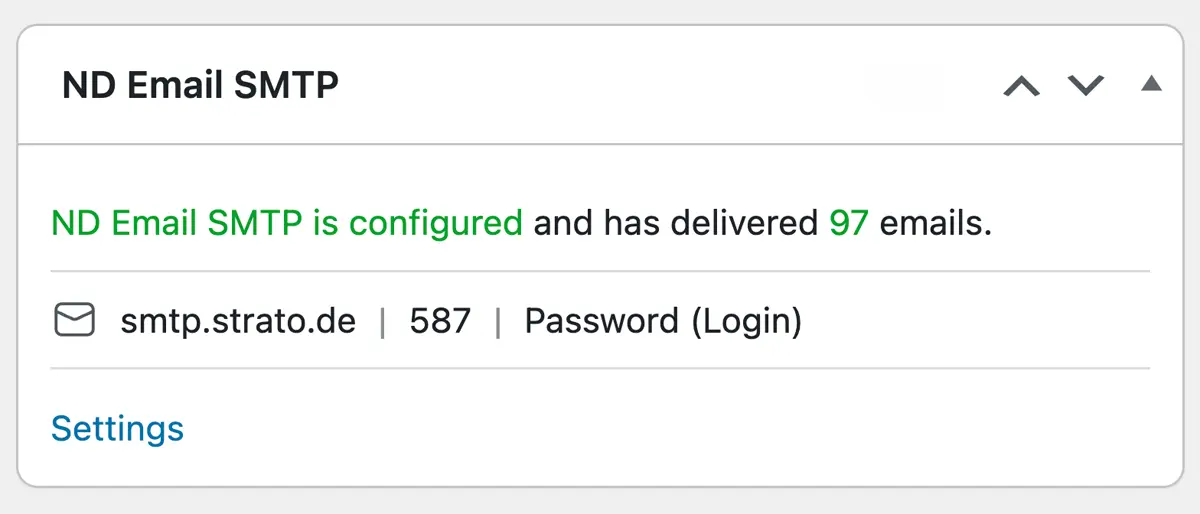
In the dashboard, a widget shows whether email sending via SMTP is set up, how many emails have been sent via this method, as well as the host, port and authentication details. A link takes you directly to the settings. If SMTP is not configured, the standard WordPress email sending method remains active.
ND Email SMTP works with anything that uses wp_mail(), including Contact Form 7, WooCommerce and WordPress itself, and alongside ND Email Log. Do not use this alongside a second SMTP plugin. Otherwise, the settings will overwrite one another. If another SMTP plugin is active, a warning will appear. Messages sent directly, bypassing wp_mail(), are not redirected. OAuth and sending via an HTTP API are not supported; only standard SMTP is supported. Upon uninstallation, the settings – including the password and the send counter – are deleted.
Documentation
Once installation is complete, you can find the full documentation under Settings → ND Email SMTP → Documentation.
Costs
Annual licence for 1 website: €25
Enjoy using ND Email SMTP!
Get in touch with usWas that helpful?